Use Fillout to update records or pages in Airtable, Notion or SmartSuite with automatically pre-filled forms.
Each platform has its own interface and terminology, so we’ve created a separate guide for updating forms in Airtable, Notion, and SmartSuite. Pick the guide that matches the platform you’re using.
Only share each update link with people who should see all of that record’s fields. An update link acts as a key to the entire record: anyone who opens it can view every field on the record, even fields that don’t appear as questions on the form. This is what lets update forms use any record field for pre-filling, answer piping, show/hide logic, and calculations.To keep certain fields private, store them in a separate table so they aren’t part of the record being updated, or restrict prefilled data so the form only loads fields mapped to questions.

Airtable guide

Update existing Airtable records with a form

Edit existing records in Airtable and pre-fill fields with data from the record.

Notion guide

Update existing Notion pages with a form

Edit existing Notion pages and pre-fill fields with data from the page.

SmartSuite guide

Update existing SmartSuite records with a form

Edit existing records in SmartSuite upon new form submissions.
Updating Zite database with Fillout form records is coming soon.

Restrict prefilled data

By default, an update form loads the entire record it’s editing, so any field can be used to pre-fill questions, pipe answers, drive logic, or run calculations — even fields that aren’t shown as questions. If a record contains fields you don’t want respondents to see, turn on Restrict prefilled data so the form only loads the fields you’ve mapped to questions.
1

Open your integration settings

In your form, click Integrate and select the integration your update form uses (e.g. Airtable, Notion, Salesforce).
2

Turn on Restrict prefilled data

Expand the Advanced section and toggle on Restrict prefilled data. Click Enable to confirm.Restrict prefilled data setting
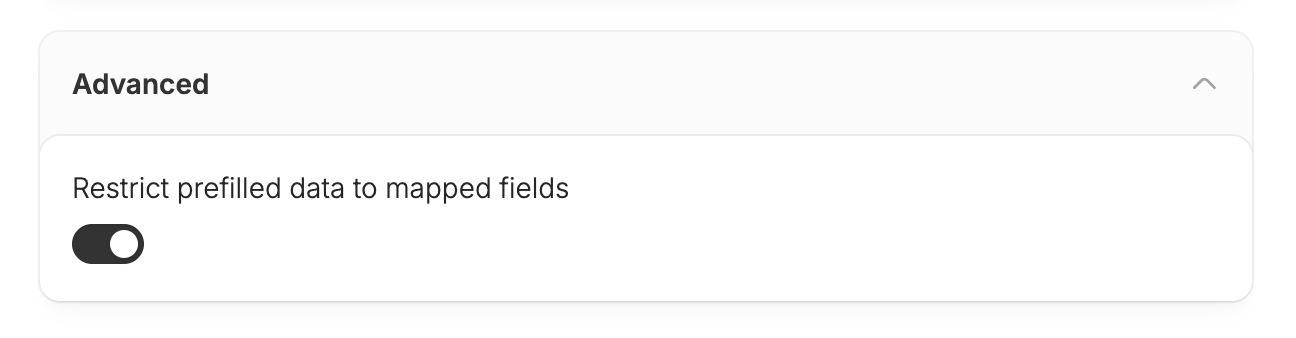
Now only the fields mapped to questions in your form are loaded. Every other field on the record stays hidden from the respondent.
Only share each update link with people who should see all of that record’s fields. An update link acts as a key to the entire record: anyone who opens it can view every field on the record, even fields that don’t appear as questions on the form. This is what lets update forms use any record field for pre-filling, answer piping, show/hide logic, and calculations.To keep certain fields private, store them in a separate table so they aren’t part of the record being updated, or restrict prefilled data so the form only loads fields mapped to questions.

Airtable guide

Update existing Airtable records with a form

Edit existing records in Airtable and pre-fill fields with data from the record.

Notion guide

Update existing Notion pages with a form

Edit existing Notion pages and pre-fill fields with data from the page.

SmartSuite guide

Update existing SmartSuite records with a form

Edit existing records in SmartSuite upon new form submissions.
Updating Zite database with Fillout form records is coming soon.

Restrict prefilled data

By default, an update form loads the entire record it’s editing, so any field can be used to pre-fill questions, pipe answers, drive logic, or run calculations — even fields that aren’t shown as questions. If a record contains fields you don’t want respondents to see, turn on Restrict prefilled data so the form only loads the fields you’ve mapped to questions.
1

Open your integration settings

In your form, click Integrate and select the integration your update form uses (e.g. Airtable, Notion, Salesforce).
2

Turn on Restrict prefilled data

Expand the Advanced section and toggle on Restrict prefilled data. Click Enable to confirm.Restrict prefilled data setting
Now only the fields mapped to questions in your form are loaded. Every other field on the record stays hidden from the respondent.
When this setting is on, the form only loads fields that are mapped to a question — so any field that isn’t mapped can’t be used elsewhere in the form, including answer piping, show/hide logic and validation, calculations, and pre-filling default values on other questionsWhen this setting is on, the form only loads fields that are mapped to a question — so any field that isn’t mapped can’t be used elsewhere in the form, including answer piping, show/hide logic and validation, calculations, and pre-filling default values on other questions.

Editing Fillout submissions

Or, to edit submissions stored in Fillout, use these approaches:

Let respondents edit their submissions

Enable response editing to ensure you have the most updated information.

Edit form submissions

Update responses directly and rerun integrations.