

Overview
Zite offers three AI models, letting you choose the right balance of speed, intelligence, and cost for your tasks.| Model | Speed | Intelligence | AI Credits | Best for |
|---|---|---|---|---|
| Zite Mini | ★★★★★ | ★★★☆☆ | ★☆☆☆☆ | Quick, simple tasks |
| Zite Pro | ★★★★☆ | ★★★★☆ | ★★★☆☆ | Most tasks (default) |
| Zite Max | ★★☆☆☆ | ★★★★★ | ★★★★☆ | Complex work and persistent issues |
Different models consume AI credits at different rates based on their underlying AI costs. For more details on AI credits and usage, check out the AI Credits guide.
Zite Max is available starting on the Business plan. Click here to see our pricing plans.
How to switch models
In the chat box, click followed by your preferred model.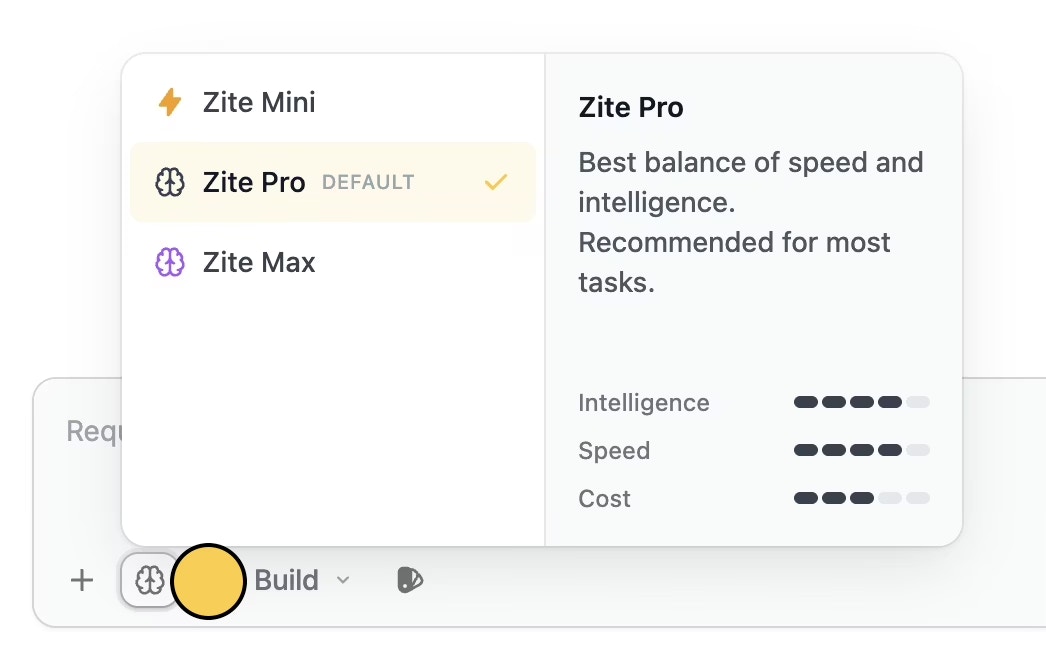
Cmd + / or Ctrl + / on your keyboard to toggle the model selector.
Mode-based model behavior
Certain editor modes automatically use Zite Max regardless of your saved or selected model:| Mode | Model used |
|---|---|
| Build mode | Your selected model |
| Plan mode | Always uses Zite Max |
| Chat mode | Always uses Zite Max |
Related articles
Editor modes
An overview of Zite’s Build, Plan, and Chat modes.
AI Credits
Learn more about Zite usage and AI credit consumption.
Subscription
Upgrade your plan or explore the Team plan to access Zite Max.